> ## Documentation Index
> Fetch the complete documentation index at: https://docs.younegotiate.com/llms.txt
> Use this file to discover all available pages before exploring further.
# Failed Scheduled Settlement Payments
> Background rules for scheduled settlement processing, failed payment handling, and offer reinstatement.
## Developer Rule
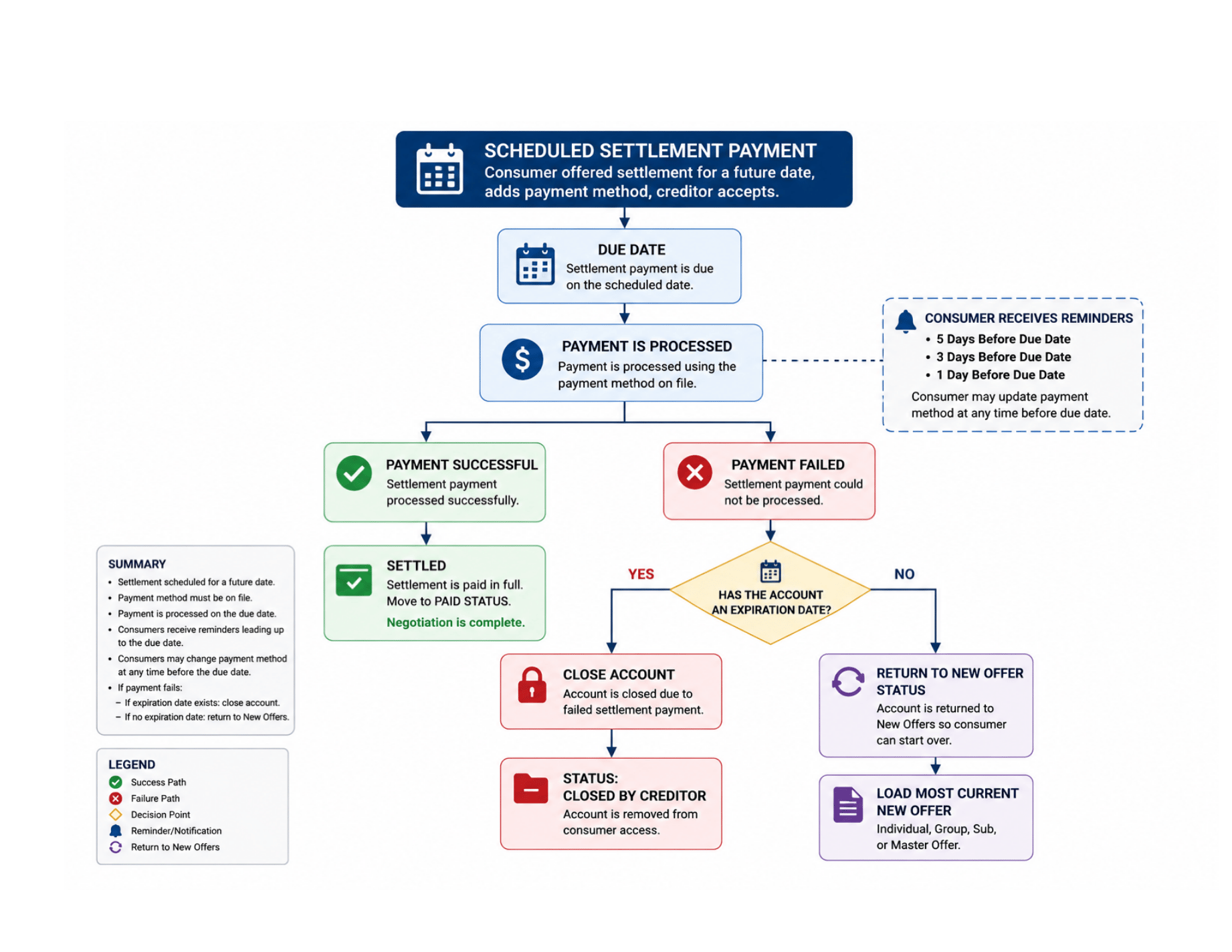
Failed Scheduled Settlement Payments occur when an approved settlement payment is scheduled for a future date, but the consumer's payment method fails when the settlement payment is processed.
Failed Scheduled Settlement Payments are managed automatically by the YouNegotiate platform.
## Includes
* Scheduled Settlement Payments
* Settlement Payment Processing
* Failed Settlement Payments
* Expiration Date Validation
* New Offer Reinstatement
* Consumer Notifications
## Scheduled Settlement Rule
Consumers may negotiate a settlement payment for a future date.
Before a settlement may be scheduled:
* Settlement Agreement Must Be Accepted
* Payment Method Must Be Added
Once accepted, the account enters:
Scheduled Settlement
Status.
### Purpose:
Track approved settlement payments awaiting processing.
## Settlement Payment Processing Rule
Settlement payments are processed on the scheduled settlement date using:
* Consumer Payment Method on File
* Basis Theory
* Participating Organization Merchant Processor
Consumers may update payment methods before the scheduled settlement date.
### Purpose:
Allow consumers to maintain current payment information prior to settlement processing.
## Settlement Reminder Rule
Consumers receive automated settlement reminders before the scheduled settlement date.
Default Reminder Schedule:
* 5 Days Before Settlement
* 3 Days Before Settlement
* 1 Day Before Settlement
### Purpose:
Provide consumers time to update payment methods before settlement processing occurs.
## Failed Scheduled Settlement Rule
A Failed Scheduled Settlement occurs when the scheduled settlement payment cannot be successfully processed on the scheduled settlement date.
Examples:
* Declined Card
* Expired Card
* Insufficient Funds
* Payment Processing Failure
### Purpose:
Identify settlement agreements that failed to complete payment processing.
## Failed Settlement Resolution Rule
If a scheduled settlement payment fails:
* The Scheduled Settlement status is closed
* The Settlement Agreement is cancelled
The platform then evaluates the account expiration status.
### Purpose:
Prevent inactive settlement agreements from remaining open after failed payment processing.
## Expiration Date Validation Rule
If the account contains an active expiration date:
* Close Account
* Remove Account from Consumer Access
* Process account according to expiration rules
### Purpose:
Honour creditor-defined expiration requirements.
## New Offer Reinstatement Rule
If no expiration date exists:
* Return Account to New Offers
* Load Most Current Available Offer
### Examples:
* Individual Offer
* Group Offer
* Sub Offer
* Master Offer
### Purpose:
Allow consumers to restart the resolution process without creditor intervention.
 ## Key Rule
Scheduled settlements require successful payment processing on the scheduled settlement date.
Failed settlement payments do not remain in Scheduled Settlement status.
## Final Developer Rule
When a scheduled settlement payment fails, the settlement agreement is closed and removed from active settlement processing.
If an expiration date exists, the account follows expiration processing rules and is closed.
If no expiration date exists, the account is returned to New Offers status using the most current available offer, allowing the consumer to begin a new resolution workflow.
## Key Rule
Scheduled settlements require successful payment processing on the scheduled settlement date.
Failed settlement payments do not remain in Scheduled Settlement status.
## Final Developer Rule
When a scheduled settlement payment fails, the settlement agreement is closed and removed from active settlement processing.
If an expiration date exists, the account follows expiration processing rules and is closed.
If no expiration date exists, the account is returned to New Offers status using the most current available offer, allowing the consumer to begin a new resolution workflow.