

Developer Rule
Expiration Dates allow participating organizations to define the period during which an account may remain available for consumer self-service resolution activity. Expiration Dates are managed automatically by the YouNegotiate platform. If an account reaches its expiration date without qualifying consumer activity, the platform automatically expires and removes the account from active consumer access.Includes
- Account Expiration Dates
- Automatic Expiration Processing
- Expired Negotiations
- Consumer Status Updates
- Compliance Reporting
- Dashboard Reporting
- Expiration Processing Flow
Expiration Date Configuration
Participating organizations may populate an Expiration Date when uploading accounts. The Expiration Date defines the final date the account may remain available for consumer self-service activity. Participating organizations may update the Expiration Date at any time. Changes must automatically update consumer account availability throughout the EcoPortal.Expiration Processing Rule
On the Expiration Date, the platform automatically evaluates account eligibility for expiration. Eligible accounts are automatically:- Closed
- Removed from active consumer access
- Processed as if a creditor delete file had been received
Purpose:
Provide automated account lifecycle management.Accounts Eligible for Expiration
Accounts may expire when they remain in:- Delivered Status
- Viewed Status
- Expired Negotiation Status and no qualifying account activity exists.
Purpose:
Remove inactive accounts that have not progressed toward resolution.Accounts Not Eligible for Expiration
Accounts must not expire when any active resolution activity exists. Examples:- Active Negotiations
- Scheduled Settlements
- Active Payment Plans
- Completed Payments
- Active Consumer Resolution Activity
Purpose:
Protect accounts actively progressing through the resolution process.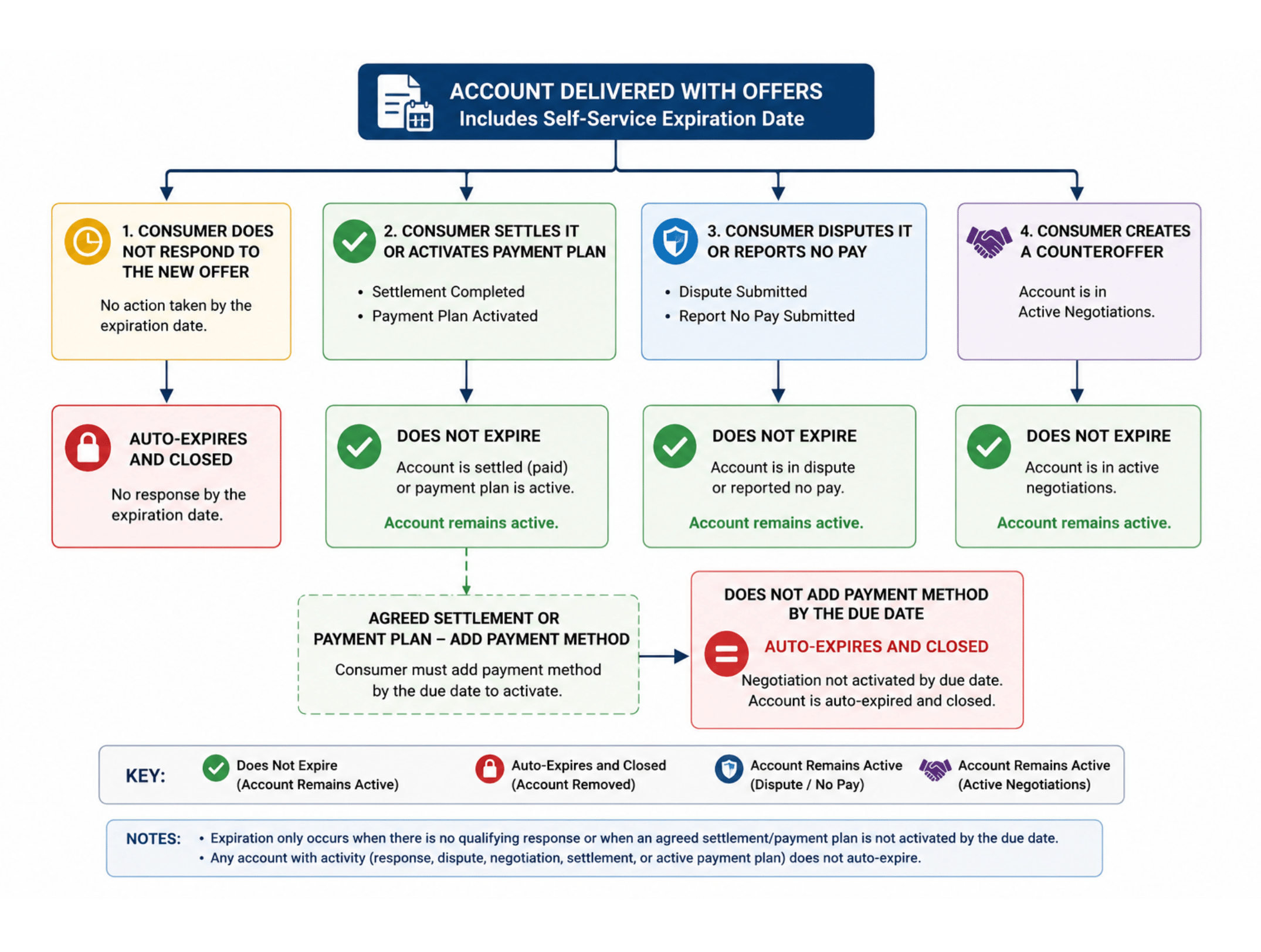
Account expiration date processing
Expired Negotiation Rule
Consumers may only activate:- Settlement Agreements
- Payment Plans before the account expiration date. If a consumer fails to complete required payment method setup before the negotiated activation deadline:
- The negotiation expires
- The account becomes eligible for expiration processing
- The account automatically expires on the expiration date if no qualifying activity exists
Purpose:
Prevent inactive agreements from remaining open indefinitely.Expiration Date Update Rule
Participating organizations may update account expiration dates after account delivery. When an expiration date is updated:- Consumer account visibility updates automatically
- Resolution timelines update automatically
- Expiration processing uses the most current expiration date
Purpose:
Allow participating organizations to manage account availability dynamically.Reporting Rule
Expired accounts must be reported within:- Dashboard Reporting
- Compliance Reporting
- Account Activity Reporting
Purpose:
Provide visibility into automatic account expiration activity.Expiration Processing Flow
A detailed expiration processing workflow will be documented to illustrate:- Account upload with expiration date assignment
- Consumer account availability period
- Expiration date evaluation
- Active resolution activity validation
- Expiration eligibility determination
- Automatic account closure processing
- Consumer access removal
- Reporting and audit updates This flow will serve as the operational reference for expiration lifecycle management and exception handling.