

Developer Rule
Payment Plan Payment Processing manages all scheduled payment activity for active payment plans within the YouNegotiate platform. Payment schedules are managed exclusively by YouNegotiate and are not hosted, stored, or controlled by merchant processors. Payments are transmitted for processing only when a scheduled payment becomes due. All payment processing uses the consumer’s active payment method on file through Basis Theory and the participating organization’s merchant processor.Includes
- Scheduled Payment Processing
- Payment Date Changes
- Payment Frequency Changes
- Temporary Holds
- Skip Payments
- Failed Payment Processing
- Payment Reminder Notifications
- Auto-Skip Processing
Payment Processing Rule
Payments are processed only on the active scheduled payment date. The scheduled payment date may be:- Original Payment Date
- Consumer-Modified Payment Date
- Recalculated Payment Date The platform must always use the most current payment schedule.
Purpose:
Ensure payment processing reflects the consumer’s most recent payment plan selections.Dynamic Schedule Management
Payment processing must automatically adjust when consumers:- Change Payment Dates
- Change Payment Frequency
- Skip Payments
- Place Plans on Temporary Hold
- Restart Plans When plan changes occur:
- Payment schedules update automatically
- BillPay Calendar updates automatically
- Future payment processing dates update automatically
Purpose:
Ensure payment processing always follows the current payment plan schedule.Payment Reminder Rule
Consumers receive automated payment reminders before each scheduled payment. Default Reminder Schedule:- 5 Days Before Payment
- 3 Days Before Payment
- 1 Day Before Payment
Purpose:
Provide consumers time to update payment methods, modify schedules, or resolve potential payment issues before processing occurs.Temporary Hold Rule
When a payment plan is placed on temporary hold:- Scheduled payments are suspended
- Payment processing is suspended
- Payment reminders are suspended
- BillPay Calendar updates automatically At the end of the hold period:
- Payment processing automatically resumes
- Payment reminders automatically resume
Purpose:
Prevent payment processing during approved hold periods.Failed Payment Processing Rule
If a scheduled payment fails:- The platform continues attempting payment processing daily
- Processing attempts continue until the next scheduled payment date Consumers may:
- Update Payment Methods
- Resolve Failed Payments
- Make Manual Payments during the recovery period.
Purpose:
Maximize successful payment recovery before additional plan actions occur.Auto-Skip Rule
If a failed payment remains unresolved one day before the next scheduled payment date:- The failed payment is automatically skipped
- The failed payment is moved to the end of the payment plan
- The payment schedule updates automatically
- BillPay Calendar updates automatically
- The payment plan remains active
Purpose:
Prevent unnecessary payment plan defaults caused by temporary payment issues.Creditor Reporting Rule
Participating organizations receive reporting related to payment plan performance. Examples:- Failed Payments
- Auto-Skipped Payments
- Payment Recovery Activity
- Active Payment Plan Status Participating organizations maintain the ability to take independent account servicing actions based on reported activity.
Purpose:
Provide visibility into payment plan performance while preserving consumer self-service flexibility.Payment Processor Rule
Merchant processors do not manage payment schedules. Merchant processors receive payment requests only when individual payment events occur. All payment scheduling, modification, suspension, restart, skip, and recovery activity is controlled by the YouNegotiate platform.Purpose:
Maintain complete platform control over payment plan management and consumer self-service functionality.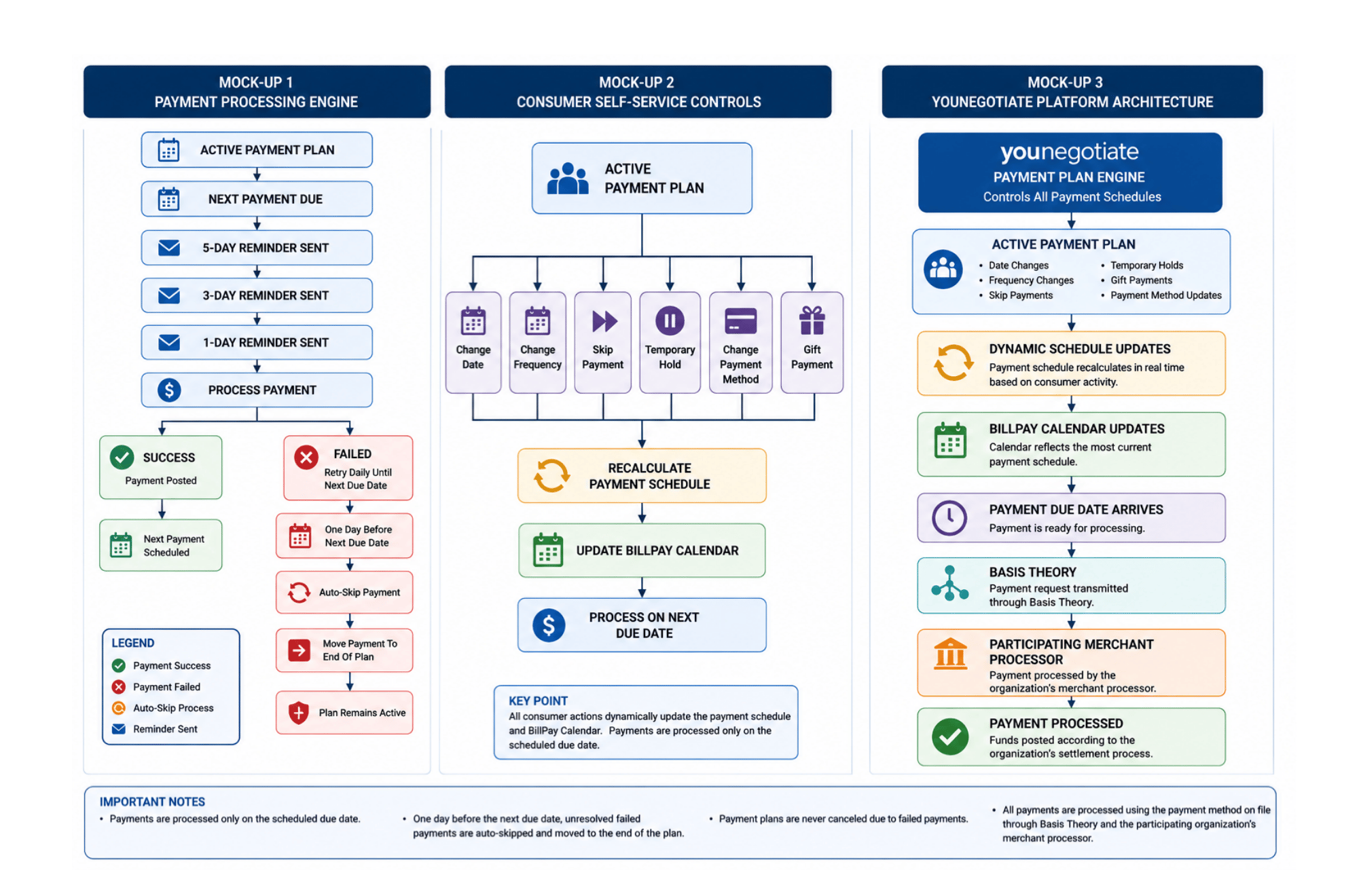
Payment plan payment processing